
 启动FreeBSD
介绍Ganbold,一个FreeBSD开发者,现在搞定了在Rockchip平台上的FreeBSD引导工作。Ganbold 告诉我们只有基本模块、GPIO、DWC USB主机模式可以工作。但这只是个开始,如果你感兴趣,在#radxa的免费IRC频道联系Ganbold,以获取更详细的资料。如何启动 FreeBSD请看 FreeBSD ARM wiki的介绍:https://wiki.freebsd.org/FreeBSD/arm/Radxa%20Rock使用Ubuntu 13.10 amd64 并且使用rkflashtool 编译的请注意:1. 通过 sudo apt-get -y install... 

双启动Android/Linux
启动流程NAND上面的双启动在NAND flash上用于双启动的boot镜像可以从下面的网址得到: http://dl.radxa.com/rock/images/dual_boot/下载之后,按照 rock/flash_the_image/zh cn 烧写。在SD卡、U盘/移动硬盘上的双启动如果你想在SD卡、U盘/移动硬盘上进行双启动,那么按照下面的步骤:把整个Nand给Android使用使用SD卡/U盘/移动硬盘安装Lubuntu双启动下面是存档的步骤:从 http://dl.radxa.com/rock/images/android/ 下载... 
SD卡启动Lubuntu 老旧方法
THIS PAGE IS OBSOLETEplease refer new page: Rock/SD imagesContents [hide] 1 THIS PAGE IS OBSOLETE2 How to boot rootfs on an SD Card3 Create Lubuntu SD Card4 Resize SD CardHow to boot rootfs on an SD CardGet a parameter file from http://dl.radxa.com/rock/images... 
设置VNC服务器
设置VNC服务器你可以通过设定VNC(Virtual Network Computing)服务器从网络上远程进入你的radxa rock桌面。 如果你还没有在你的rock板上安装VNC服务器,需要用下面的命令安装它(前提是你的板子能连接网络):sudo apt-get install tightvncserver第一次运行时设定密码:root@radxa:~# vncserver 你需要设定一个进入桌面的密码:Password: ... 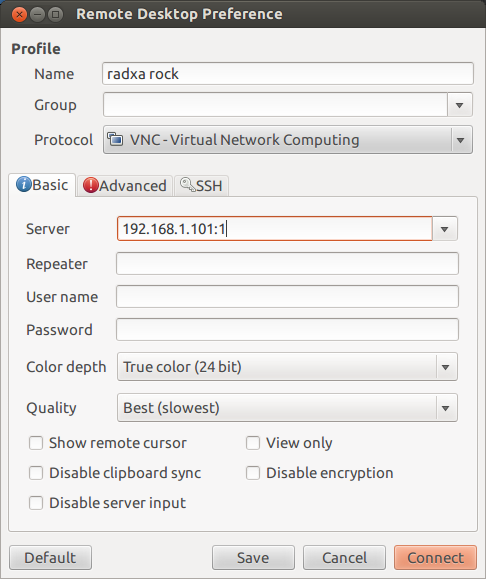
使用LED
The Radxa Rock has 3 LEDs on board.LEDGPIO ref.GPIO numberGreenGPIO0_B4172BlueGPIO0_B6174RedGPIO0_B7175All are programmable using either LEDs class devices or GPIOs.Contents [hide] 1 LEDs as class devices2 turn off LEDsLEDs as class devicesOn the latest kernel images (Ubuntu 14.0... 
显示
The cpu of Radxa Rock - RK3188 has two LCD controllers, LCD0 and LCD1. On RR, LCD1 is connected to HDMI and LCD0 is connect to AV out and the LCD0 signal are also exported on the extension header.There is some sysfs interface exported to control the display related stuff. The following should w... 
音频
Linux 声音设置HDMI/AV 输出音频你可以使用下面的命令去测试Radxa Rock上的音频: root@radxa:~# speaker-test -t wav -c 2会输出以下信息: speaker-test 1.0.25 Playback device is default Stream parameters are 48000Hz, S16_LE, 2 channels WAV file(s) Rate set to 48000Hz (requested 48000Hz) Buffer size range from 48 t... 
制作Ubuntu固件
安装所需要的包 sudo apt-get install qemu-user-static binfmt-support生成镜像文件 dd if=/dev/zero of=rock_rootfs.img bs=1M count=1024 mkfs.ext4 -F -L linuxroot rock_rootfs.img #kernel use the label linuxroot to mount the rootfs as / sudo mount -o loop rock_rootfs.img /mnt当然你也可以从linaro下载已经编译好的ubuntu... 编译Linux主干内核(最新版本内核)
Linux Kernel 3.18-rc5StatusWhat currently works in Linux mainline:UARTSPII2CGPIOs / LEDs / IRPWMUSBSD/MMCEthernetWifiBluetoothWhat remains to be done:DRM Display driver / LCD controllerHDMI drivers (ITE66121 / RK616)TV OUT drivers (RK1000)NAND flash supportRequirementsUbuntu 14.10 / GCC 4.9+ (GCC 4.... 编译内核 (linux)
开发要求radxa rock (全版或者简版)64bit Linux (e.g. Ubuntu) 开发环境micro USB 数据线5V/2A的电源安装编译工具链如果你的电脑没有安装工具链,那么可以按照以下命令安装ARM工具链,并编译相关的内核包: sudo apt-get install gcc-arm-linux-gnueabihf sudo apt-get install lzop libncurses5-dev export ARCH=arm export CROSS_COMPILE=arm-linux-gnueabihf-Install the too... 
Sxx1314

站长:沁雨寒
签名:扫描关注微信公众号
签名:扫描关注微信公众号
最新日志
热门日志


