
如何刷机到SD卡
时间:2015-3-30 16:08 热度:2533° 评论:0 条

- Download the Win32DiskImager from here.
- Download the image from above link.
- Use the Win32DiskImager to Write the image into SD card
SD images for the rock are images booting and running on the uSD card completely. This is good when you want to try different OS or new version of the firmware without touching the nand flash.
Downloading SD Images
Check your hardware revision (Pro or Full/Lite), then download image "for SD card" from here
Writing SD image to SD card
Windows
See the readme in the individual image zip file for additional information on which tool to use.
Before beginning, you will need to prepare a high quality SD card of at least 8GB. A poor quality SD card will result in boot failures.
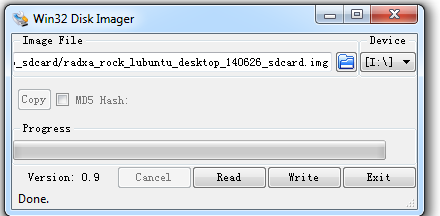
Linux
We use dd in Linux to write the image:
sudo dd if=radxa_rock_xxxx_sdcard.img of=/dev/sdx # x is the disk name of your uSD card on your PC
Mac OS X
We use dd and Apple's diskutil utility to write the image:
- Run diskutil list to determine the drive associated the SD card (ex: /dev/disk4)
- Unmount the existing disk sudo diskutil unmountDisk /dev/diskX where X is the disk name of your uSD card on your PC
- Write the image file to the uSD card sudo dd if=radxa_rock_xxxx_sdcard.img of=/dev/diskX where X is the disk name of your uSD card on your PC
Booting to SD Card
- Power off the Rock
- Insert the SD card
- Power on the Rock and it will boot to the SD card
 您阅读这篇文章共花了:


捐赠支持:如果觉得这篇文章对您有帮助,请“扫一扫”鼓励作者!

本文作者:沁雨寒 文章标题: 如何刷机到SD卡
本文地址:https://blog.sxx1314.com/rkty/235.html
版权声明:若无注明,本文皆为“unix 软硬件 技术宅 ”原创,转载请保留文章出处。百度已收录
本文地址:https://blog.sxx1314.com/rkty/235.html
版权声明:若无注明,本文皆为“unix 软硬件 技术宅 ”原创,转载请保留文章出处。百度已收录


Sxx1314

站长:沁雨寒
签名:扫描关注微信公众号
签名:扫描关注微信公众号
最新日志
热门日志


