
"变砖"了怎么办
时间:2015-3-30 16:10 热度:4414° 评论:0 条

- Turn off Power.
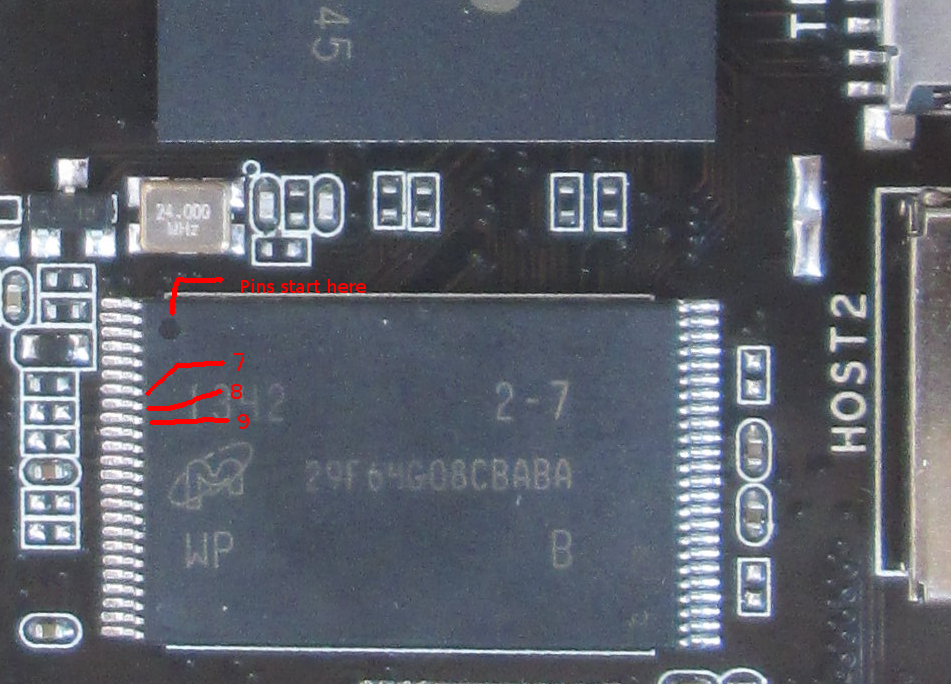
- Connect pin 8 and 9 on the nand with a needle and plug OTG USB cable in the PC.
- After Plugin remove needle connection. In RKBatchTool the square should now show up blue (if it isn't blue, retry).
- Click the restore button and upload an update.img
- Its useful to use a magnifying glass or (smartphone-)camera zoom to get the right pins.
- Always start counting pins on the edge of the chip where the small circle is molded in or printed on.
Unbrick Rock
Is it bricked?
When writing update.img to nand RKBatchTool failes with following message: "Prepare IDB Fail" (or similar error messages like "IDB download failed" when writing to nand with other tools)
Radxa is "bricked". It is not really bricked, first make sure there's no SD card connected while trying to flash the device, otherwise the bootloader is corrupted at this time, you can always recover it.
To recover it:
Hints
Linux
sudo upgrade_tool List of rockusb connected No found rockusb,Rescan press <R>,Quit press:r List of rockusb connected DevNo=1 Vid=0x2207,Pid=0x310b,LocationID=21f Maskrom Found 1 rockusb,Select input DevNo,Rescan press <R>,Quit press:1 Rockusb>uf /tmp/radxa-rock-alip-desktop.img Loading firmware...
If you see Maskrom(Normally it's Loader), that means you have successfully short cut the nand flash.
 您阅读这篇文章共花了:


捐赠支持:如果觉得这篇文章对您有帮助,请“扫一扫”鼓励作者!

本文作者:沁雨寒 文章标题: "变砖"了怎么办
本文地址:https://blog.sxx1314.com/rkty/238.html
版权声明:若无注明,本文皆为“unix 软硬件 技术宅 ”原创,转载请保留文章出处。百度已收录
本文地址:https://blog.sxx1314.com/rkty/238.html
版权声明:若无注明,本文皆为“unix 软硬件 技术宅 ”原创,转载请保留文章出处。百度已收录


Sxx1314

站长:沁雨寒
签名:扫描关注微信公众号
签名:扫描关注微信公众号
最新日志
热门日志


